If you’re a procurement professional in manufacturing, aerospace, shipbuilding, or any industry that relies on precise material cutting, you’ve likely felt the pressure of choosing a laser cutter. It’s not just a purchase—it’s an investment in your production efficiency, product quality, and long-term profitability. With so many options on the market, from low-cost entry-level models to high-power industrial systems, how do you avoid costly mistakes and pick the machine that actually fits your needs?
This guide was made for you, we analyzed what the laser cutter was, what was the most important item at the time of purchase, what traps avoided incremental measures, and why Keensaw was a trusted partner. In the end, you will have a clear road map where you can make wise decisions and a road map that is appropriate to your present mission and the direction of your future journey.
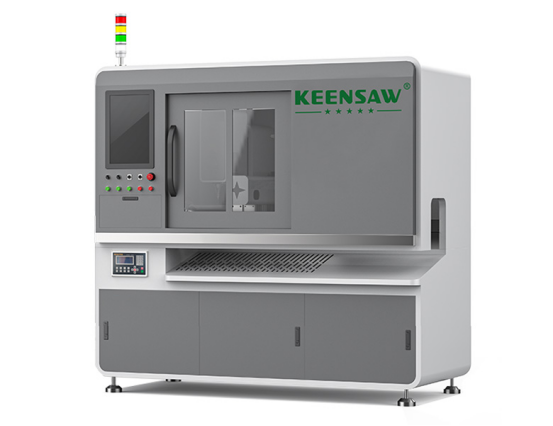
A laser cutter is a high precision tool that uses a focused laser beam to cut, engrave or mark materials. Unlike conventional saws, such as belt or circular saws, it relies on thermal energy to melt, evaporate or burn materials, resulting in cleaner edges, faster speeds and less material waste.
Today’s laser cutters are categorized by the type of laser they use, each tailored to specific materials:
Choosing the right laser does not determine “most powerful” or “cheaper”, but rather enables equipment to meet its needs. Five contentious elements of the evaluation are as follows:
Stability of the laser cutter directly affects cutting accuracy and longevity. I don’t want the system down for six months if it gets organized or there are too many orders. The main indicator of stability is:
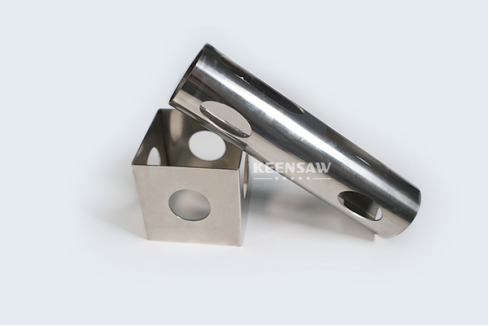
This is make-or-break: the laser cutter must handle your materials, thicknesses, and production volume. Start by asking:
Your business will grow—so should your laser cutter. Avoid machines that lock you into a single use case.
Don’t just look at the upfront price—calculate the total cost of ownership (TCO). A cheap machine might cost more in repairs, downtime, and wasted materials. Break down costs like this:
|
Cost Category |
What to Include |
Example (Industrial Fiber Laser) |
|
Upfront Price |
Machine + installation + training |
200,000 (varies by power) |
|
Operating Costs |
Electricity (high-power machines use ~10–20kWh/hour), consumables (lenses, mirrors) |
500/month |
|
Maintenance Costs |
Annual service, replacement parts (e.g., laser tubes last 8,000+ hours for quality models) |
3,000/year |
|
Downtime Costs |
Lost production if the machine breaks (e.g., $1,000/hour for a busy factory) |
Varies—avoid with good after-sales support |
KEENSAW balances cost and quality: its European-standard machines come with competitive pricing, plus a 1-year warranty (free replacement parts) to lower long-term risks.
Follow this 5-step workflow to avoid guesswork and ensure you pick the right machine:
Start with the basics—write down:
Use your core needs to filter specs. For example:
|
Core Need |
Recommended Spec |
|
Thin metals (1–6mm) |
1000W–2000W fiber laser, ±0.05mm precision |
|
Thick metals (12mm+) |
6000W+ fiber laser, auto-feeding |
|
High-volume production |
Fully automatic system, multi-function modules |
|
Small workspace |
1300×2500mm worktable, compact frame |
Ask the seller for detailed information about the TCO. For example:
A laser cutter is only as good as its support. Check:
Don’t buy it randomly. Contact 3–5 suppliers (like KEENSAW) and:
Even experienced buyers make these mistakes—here’s how to steer clear:
A $30,000 laser cutting machine may seem cheap, but if it disassembles every month and costs 5% of the material ($10,000 per year), it is a bad investment. Prioritize TCO over upfront cost—KEENSAW’s mid-range machines cost more initially but save you money in repairs and waste.
Buying a 6000W laser to cut 2mm aluminum is like using a sledgehammer to drive a nail. It consumes energy, increases costs, and is more complex to operate. Stick to the power and features you actually need.
A machine with great specs is useless if your team can’t operate it. Avoid:
When comparing laser cutting machine suppliers to meet your industrial procurement needs, KEENSAW, with its unique industry expertise, integrated solutions, cost efficiency and global support, has almost no competitors. Therefore, KEENSAW can stand out among other brands.
Unlike brands that merely offer independent laser cutting machines, KEENSAW leverages over 15 years of expert experience in one-stop metal cutting solutions to provide laser cutting machines that seamlessly work with CNC carbide circular saws, band saws, and chamfering machines, creating a unified production line, eliminating workflow differences, and enhancing overall efficiency. This is a huge advantage for industries such as aerospace, shipbuilding and wind power generation that require multi-process metal cutting. While other brands may only focus on laser cutting performance, the systems designed by KEENSAW can handle a wide range of metal processing requirements, from thin Ø10mm tubes to thick Ø230mm blanks, with the same high precision (±0.05mm cutting accuracy), which makes it rank among the top three in the world in metal cutting machinery.
In terms of cost, KEENSAW offers European-quality machines (certified by ISO9001:2016 and CE) at 20-30% lower prices than its European and American competitors, thus enabling it to achieve superior durability and performance without a high price tag. More importantly, its transparent total cost of ownership model, along with a one-year warranty that includes free replacement parts, effectively reduces long-term maintenance and downtime costs compared to brands that offer shorter warranties or charge high costs for replacement parts.
In terms of support, KEENSAW outperforms its competitors with its end-to-end service ecosystem. From pre-sale (machine recommendations tailored to your exact materials and production requirements) to in-sale (real-time production updates and rigorous pre-delivery testing to ensure the machine works perfectly before shipment), and then to providing 24/7 after-sale technical support to customers in over 50 countries KEENSAW‘s support network is far faster and more comprehensive than brands that only offer limited regional support or delayed troubleshooting. Furthermore, as the business grows, KEENSAW‘s modular laser cutting system can be upgraded through chamfering, drilling or marking modules, thus eliminating the need to invest in purchasing brand-new machines. This flexibility is something that other brands’ static and non-upgradable models cannot offer.
Buying a laser cutter isn’t about checking boxes on a spec sheet—it’s about matching the machine to your needs and prioritizing long-term value over short-term savings.
Remember:
By following this guide, you’ll avoid costly mistakes and invest in a laser cutter that boosts your efficiency, quality, and profitability for years to come.
Q1: What type of laser cutter is best for metal processing?
A: Fiber laser cutters are the best choice—they’re fast, energy-efficient, and precise for stainless steel, carbon steel, and aluminum. KEENSAW’s fiber laser cutters are optimized for industrial metal cutting, paired with its circular saws for a complete solution.
Q2: How do I know if a laser cutter is durable?
A: Look for solid steel frames, industrial-grade rails (Japanese/German), ISO 9001/CE certifications, and a supplier with a track record (like KEENSAW’s 15+ years). Also, ask about the lifespan of key parts (e.g., laser tubes, motors).
Q3: What’s the difference between a KEENSAW laser cutter and a standard model?
A: KEENSAW’s laser cutters are built for industrial metal cutting—they integrate with its other machines (band saws, chamfering machines) for a one-stop solution, offer 24/7 global support, and have a lower TCO thanks to durable parts and low energy use.
Q4: How long does it take to get a KEENSAW laser cutter?
A: Most standard models ship within 4–6 weeks. Custom solutions take 8–10 weeks, with regular updates on production progress.
I can help you adjust the data tables in this blog to better highlight KEENSAW’s cost advantages, would you like that?
Contact us if you have any questions we will reply as soon aspossible